
Wholesale Inventory Software for Stock, Purchasing & Billing
Keep wholesale item records, stock, purchases and billing connected. Review the locations, reports and operational requirements for your selected configuration.
What Is Wholesale Inventory Software?
Wholesale inventory software connects item stock with purchases, sales and invoices. Distributors may also need warehouse picking, delivery routes or broader ERP functions. DigiNizam’s scope on this page is the inventory, purchasing and billing workflow reviewed during the demo.
Wholesale Stock and Billing Records
Review stock, purchases and sales together so your team can discuss one consistent set of item and transaction records.
Bring example item lists, supplier documents and wholesale invoices. Confirm the supported stock locations, billing actions and reports before agreeing on scope.

Review Your Wholesale Inventory Workflow
Review how item records, purchasing and billing fit your wholesale business. Confirm warehouse, dispatch and location requirements for the selected configuration.
Delivery routes, fleet manifests, field-sales apps, automated audits, replenishment automation and third-party accounting integrations require separate confirmation. They are not included as capabilities in the inventory and billing scope described here.
- Item and location requirements
- Purchasing and billing review
- Warehouse and dispatch requirements
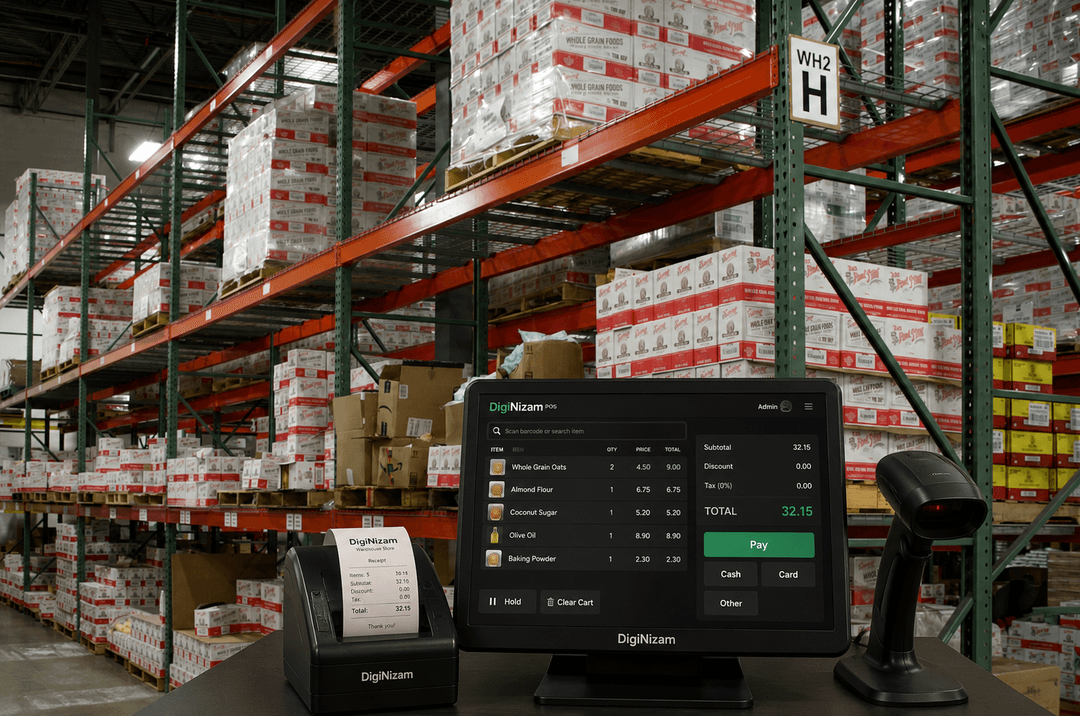
Wholesale Workflows to Review
Inventory records
Review item fields, stock movements and the locations available in the selected configuration.
Billing workflow
Review item lookup, sales, invoices and any supported discount or return actions.
Barcode and labels
Confirm barcode formats, scanner compatibility and label fields using your product examples.
Purchasing records
Review supplier records, purchasing and receiving steps available in your setup.
Business reports
Review the sales, stock and purchasing reports available in your selected configuration. Confirm local tax obligations separately.
Locations and connectivity
Confirm the locations, user access and connectivity needed for your selected setup.
Discuss Your Wholesale Setup
Wholesalers and distributors can review stock, purchasing and billing with DigiNizam. Confirm dispatch, warehouse and delivery requirements separately before agreeing on scope.
Review the stock and purchasing features and confirm the functions available for your selected setup.
See how DigiNizam pricing is agreed after the demo and requirements discussion.
Wholesale and distribution questions
Direct answers for common wholesale inventory questions.
Wholesale inventory software connects item stock with purchases, sales and invoices. A distribution ERP may cover broader finance, warehouse, delivery and field-sales processes. DigiNizam's scope here is the inventory, purchasing and billing workflow reviewed in a demo, with additional requirements assessed separately.
The agreed configuration determines the available item records, stock locations, purchases, receiving, billing and reports. Review those steps with sample documents during the demo. Route planning, fleet tracking, automated audits and third-party logistics integrations are separate requirements to confirm.
Review DigiNizam for Your Wholesale Business
Book a demo to review stock records, purchasing, billing and location requirements. Pricing is discussed after the demo, once requirements are understood.
Solutions for different businesses
Explore supported industries and discuss the setup relevant to your business.







Service & support
Our offering, billing and support at a glance.
Global customers
DigiNizam serves businesses globally. Discuss your industry and requirements with our team.
English-language offering
The current DigiNizam offering is available in English.
Month-end invoicing
Invoices are issued at month-end under the terms agreed with each customer.
24/7 technical support
DigiNizam provides 24/7 support. Contact our team for help with your setup.